
compare
Medical Alert Systems vs Smartwatches
Readers comparing Medical Alert Systems vs Smartwatches need clearer tradeoffs, not generic feature lists.
A parent who wants a watch and an adult child who wants an emergency button may be trying to solve different problems. Your parent wants something comfortable and familiar. You want a reliable way for them to reach help when their phone is across the room. Comparing medical alert systems vs smartwatches starts with those two needs, rather than a list of sensors.
A monitored medical alert system is built around a response service. A consumer smartwatch combines everyday features with emergency functions that vary by model. A dedicated medical alert watch sits between those categories: it looks like a watch but connects to a monitoring center. Choose by who answers, what your parent can operate, and whether the equipment will actually be worn.
This guide provides a household decision framework, not a hands-on product ranking. Manufacturer examples illustrate differences; they do not establish that one device is safer for every person.
Compare the emergency pathway first
| Decision point | Monitored medical alert system | Consumer smartwatch | | --- | --- | --- | | Who answers? | A monitoring center under the service agreement | Emergency services or designated contacts, depending on the device and setup | | How is help requested? | A dedicated button; some models offer automatic fall detection | A button sequence, screen control, or supported automatic alert | | What must stay connected? | A home base or mobile device using its supported connection | The watch and any required phone, network, or account configuration | | What needs daily attention? | Wearing the button; charging mobile equipment as instructed | Wearing, charging, and maintaining emergency settings | | What are you purchasing? | Equipment plus the selected response service | A multipurpose device, with any required connectivity or additional service |
The decisive question is what happens after an alert. Bay Alarm Medical describes its home system as connecting the wearer to an agent who can coordinate with contacts and emergency services. Apple describes Emergency SOS as calling local emergency services. Those are different response arrangements. Bay Alarm Medical home system, Apple Emergency SOS instructions.
For each candidate, write a short sequence: press button, connect to whom, communicate how, notify whom. Ask the provider what happens when the wearer cannot speak. Do not treat a text to a busy relative as equivalent to an answered call.
Understand the three equipment categories
An in-home medical alert generally pairs a wearable button with a base station. In Bay Alarm Medical's example, the base provides two-way speech, with landline and cellular versions available. A button's advertised range does not tell you whether conversation is audible from your parent's bathroom or upstairs bedroom. Manufacturer's in-home system details.
A mobile medical alert is intended to accompany the wearer outside the house. Ask where its microphone and speaker are located, whether a separate pendant communicates through another unit, and what your parent must carry on a walk. Have the salesperson identify every required piece of equipment rather than showing only the wearable accessory.
A consumer smartwatch may be attractive because your parent already uses it for time, messages, or activities. Its emergency capabilities require a separate review. Avoid assuming that a fitness tracker has the same features as a specific Apple Watch or another emergency-capable model.
A medical alert watch is a fourth shopping label but belongs to the response-service category when it is professionally monitored. For example, Bay Alarm Medical's SOS Smartwatch has a dedicated SOS button, an included cellular connection, and optional fall detection, without requiring a paired smartphone. Confirm the current package before ordering. SOS Smartwatch manufacturer information.
Match the controls to your parent's abilities
Ask your parent to demonstrate the intended action while seated comfortably. Can they find the button by touch? Can they press and hold it with their weaker hand? Can they understand the confirmation sound? Use the manufacturer's demonstration or approved test procedure, and avoid placing an unnecessary emergency call.
A parent with painful fingers may struggle with a small side button. Someone with limited vision may have trouble reading a confirmation screen. A touch interface that feels straightforward to an adult child may be difficult for the person wearing it. Check both the physical control and the instructions required after activating it.
For hearing difficulties, ask about volume and communication alternatives. With a base-station system, test speech from the actual rooms your parent uses. With a watch or mobile unit, consider whether your parent can hear the speaker while the device is worn normally. Ask the service how it responds to an unanswered voice connection.
If memory problems are involved, observe whether your parent remembers to wear the device and recognizes its purpose. A simpler button may reduce some tasks, but equipment alone does not resolve supervision needs. Ask their care team to help assess whether being alone remains appropriate, especially when your parent cannot reliably seek assistance.
Treat fall detection as a backup
Automatic detection can be useful when someone cannot press a button, but it is not proof that every fall will trigger help. Apple's instructions say its supported watches detect hard falls and cannot detect all falls. Movement after detection affects whether an automatic call is made. Apple Fall Detection guidance.
For Apple Watch, check that Fall Detection is set to Always On if that is the intended use, and that Wrist Detection is enabled for automatic calling. Apple describes an immobility period followed by a countdown before the automatic call. Read the current instructions for the exact watch and software rather than relying on a relative's recollection of setup. Apple's setup and calling requirements.
For a medical alert, ask whether detection is included, an extra subscription, or a different wearable. Request the manual's limitations and cancellation instructions. Do not assume that a provider's watch, standard pendant, and fall-detection pendant behave identically.
Never stage a fall to test detection. Use an approved equipment check. If your parent needs help and can activate the button, the plan should be to request help rather than wait for a sensor. Neither category prevents a fall; shopping for an alert should accompany a conversation about the circumstances of previous falls and support at home.
Verify connectivity where life happens
Build a location list before contacting a seller: bedroom, bathroom, kitchen, garden, mailbox, and usual walking route. Mark where your parent usually leaves their phone. This exposes a common mismatch between a watch that works beside a phone and the family's expectation that it works independently everywhere.
Apple states that Emergency SOS needs a supported satellite, cellular, or internet-connected Wi-Fi calling pathway, using the watch or nearby iPhone as applicable. It also notes that network configuration can affect emergency calling. Do not assume that an unactivated cellular watch provides dependable standalone emergency access. Apple's connectivity requirements.
For a home system, ask which connection the quoted version uses and how it behaves during a power or telephone-service outage. For a mobile system, ask which network carries its calls and whether coverage can be checked at the service address. A household's existing mobile phone carrier may differ from the alert provider's network.
During the return period, arrange provider-approved tests in the rooms that matter. Record connection failures, unclear speech, and any equipment that must be moved. A coverage map is a starting point; the practical question is whether the purchased setup works in this household.
Plan for charging gaps and bathroom use
Write down when your parent would remove the device. Common gaps include sleep, showering, and charging. Then decide what help route remains available during each gap. A watch charging beside the bed cannot be pressed by someone in another room.
Battery design differs even within medical alerts. Bay Alarm Medical describes long-life batteries in its home buttons, while its smartwatch requires routine charging. Its watch page lists battery duration of up to 6–18 hours depending on conditions and about 2–3 hours for charging. Those figures are an example, not a category-wide promise. Home button specifications, Watch battery specifications.
Ask how low-battery warnings are delivered and who notices them. A warning your parent dismisses does not create a charging routine. Try placing the charger where an existing habit happens, and assign a named person to check that the device goes back on after charging.
For bathroom use, read the exact model's water-use instructions. Ask specifically about showers, baths, soap, hot water, and charging after exposure. Marketing terms such as water resistant do not answer every use question. Include the strap or pendant attachment in the comfort trial, since a device that irritates the skin may spend more time on a shelf.
Compare the full household cost
Get written quotes for two or three suitable setups. For a monitored alert, separate equipment, activation, monitoring, optional detection, accessories, shipping, and replacement charges. For a consumer watch, include the device, any required phone, connectivity, and paid services you intend to use.
Use a simple worksheet: one-time charges plus twelve months of recurring charges, plus optional items. As an arithmetic example, a hypothetical $40 monthly service with a $150 equipment charge totals $630 in the first year before other charges. This is a budgeting illustration, not a current product quote.
Check whether a quoted discount requires annual payment and what happens to unused months after cancellation. Ask who owns the equipment, what must be returned, who pays return shipping, and when billing stops. Save the answers with the order confirmation so another family member can manage the account if necessary.
Also count the family's time. A watch your parent already operates confidently may require little new support. An unfamiliar device may need account setup, instruction, troubleshooting, and repeated reminders. The useful comparison is the cost of a workable arrangement, rather than the lowest advertised monthly figure.
Decide who receives information and who responds
Make two lists: people allowed to see device information and people expected to act during an alert. They need not be identical. Discuss location sharing with your parent and agree on its purpose before setting up family access.
Ask exactly which alerts the selected service sends. Low-battery messages, button activations, location updates, and missed connections are different events. Confirm whether access requires a subscription, an app, or specific phone permissions. Have each caregiver check that messages reach their own phone using supported tests.
Name a primary and backup contact, and describe their responsibilities. Who can reach the home? Who knows the entry arrangement? Who can update the service when a contact travels? Ask the monitoring provider about its escalation procedure rather than expecting it to infer the family's preferences.
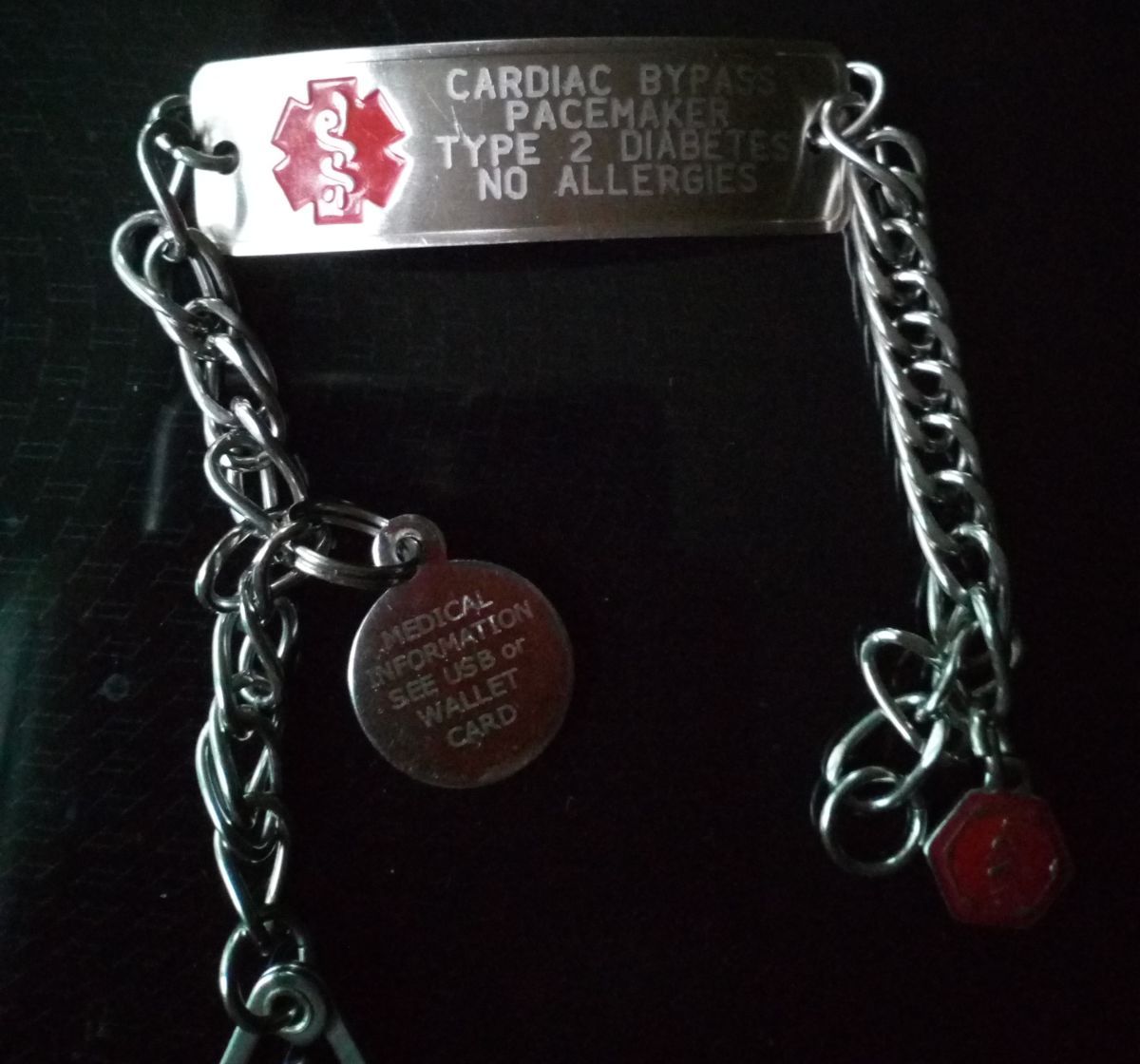
An identification bracelet serves another purpose. The bracelet in this article's featured image provides emergency identification; it is not evidence of an electronic calling feature. A medical ID can complement an alert device, but it should not be mistaken for a monitored system.
Apply the comparison to three households
For a parent who mainly stays home and dislikes charging gadgets, begin by evaluating a monitored home setup with a wearable control they can operate. Check conversation from the bathroom and bedroom, along with an approved test of button range. The main question is whether the response service and home layout fit together.
For a parent who already wears a compatible smartwatch every day, review the existing emergency settings before buying another device. Confirm their usual phone and network arrangement, practice identifying the manual help control, and plan charging gaps. Familiarity is a practical advantage only when the emergency pathway also matches the family's needs.
For a parent who walks independently but wants a professional response service, compare mobile medical alerts and monitored watches. Ask them to try the weight, strap, and controls. If a watch is preferred, its charging demands deserve the same attention as its appearance.
These are starting points for comparison, not automatic recommendations. If your parent rejects the first design, ask whether comfort, stigma, difficult controls, or privacy is the reason. That answer is more useful than insisting they wear equipment they keep removing.
Use the return period to make the decision
Before ordering, confirm the return deadline and approved testing method. Keep a short diary of wear time, charging, connection checks, and questions your parent asks. Evaluate an ordinary weekday and weekend rather than a single supervised demonstration.
At the end of the trial, ask your parent to explain how they would request help. Check whether the agreed backup route exists during charging. Verify contact details and document any access instructions with the selected service. Resolve failed checks before treating the setup as ready.
Choose the arrangement your parent can use consistently and whose response pathway the family understands. A monitored pendant, a consumer smartwatch, and a monitored watch can each meet different needs. The strongest purchase decision connects the wearer, the equipment, and an actual plan for someone to answer.